Your Private Network.
In Every Hotel. Every Country.
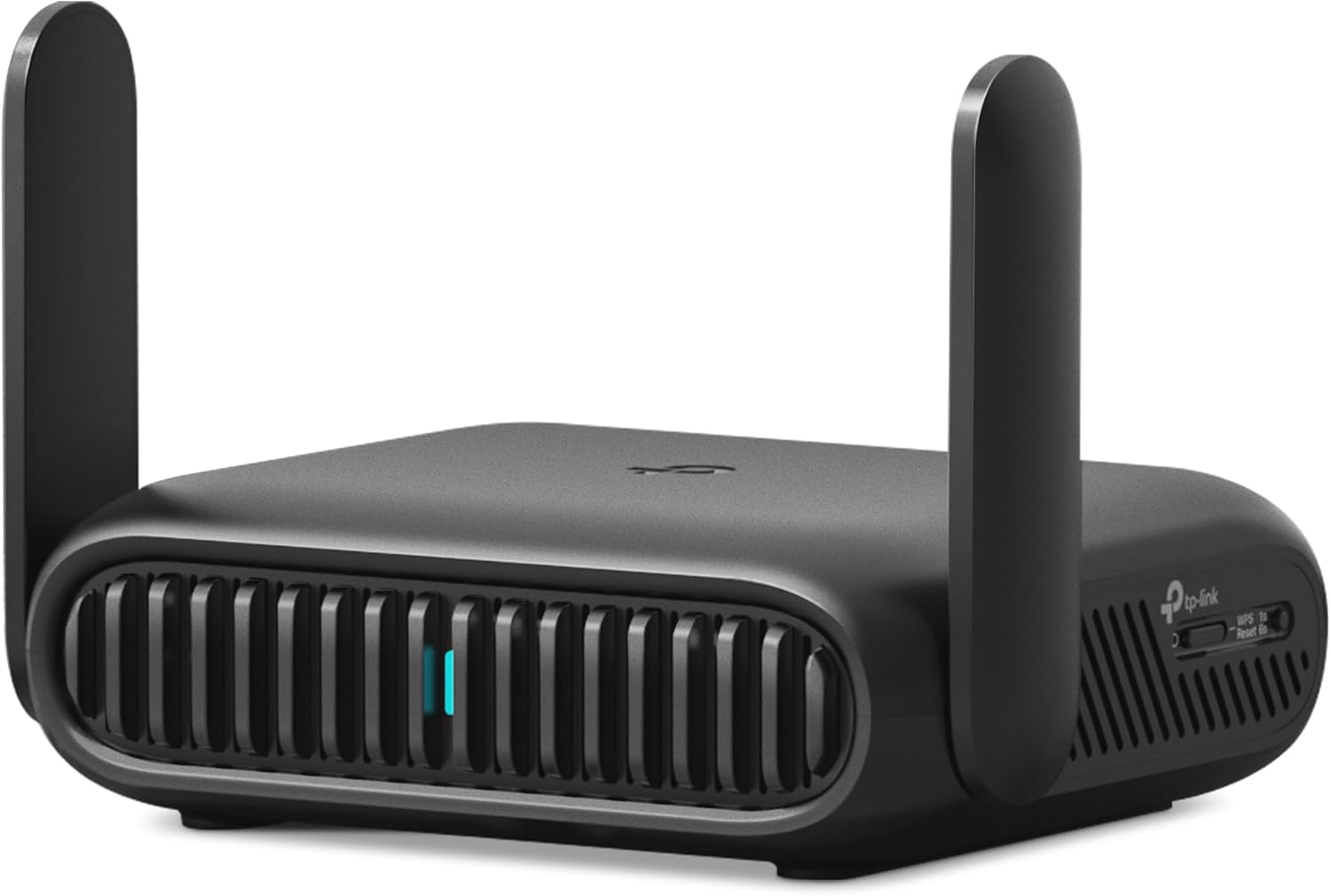
Wi-Fi 7 travel router that turns any hotel ethernet, public Wi-Fi, or phone tether into a private secure network for up to 90 devices. Seven connection modes. 2.5G WAN. USB 3.0 for tethering and storage. OpenVPN and WireGuard VPN. Dual-WAN failover. Power bank compatible. International plug adapters included. Fits in your palm.
The Hotel Wi-Fi Problem,
Solved for Every Device You Carry.
The modern traveller typically carries three to five devices: laptop, phone, tablet, smartwatch, and perhaps a streaming stick. Every hotel, cruise ship, airport lounge, or co-working space presents the same friction: a single public Wi-Fi network that requires individual registration on each device through a captive portal (the "accept terms and conditions" login page), provides no private network between your devices, and often throttles or limits connections per user. Connecting five devices means five separate captive portal logins — or not connecting some devices at all.
The Roam 7 solves this in one step: connect the router to the hotel network once through its Hotspot Mode (the router handles the captive portal login, not your devices), and all your devices join the router's private Wi-Fi network instead. The hotel sees one connection; your devices see a private network. NAS Compares confirmed: "it aims to reduce friction when you are carrying multiple devices, sharing a single connection, or switching between different uplinks while keeping the same SSID and settings for your own gear." Macworld reviewed it: "one of the few routers that can actually join you on your travels" — noting it provides "versatile connectivity features that make it a great option for anyone that travels a lot."
Wi-Fi 7 BE3600 dual-band (2.4GHz + 5GHz, no 6GHz). 2.5G WAN + 1G LAN Ethernet ports. USB 3.0 for phone tethering, USB modem, or storage sharing. USB-C power via included adapter or any 5V/3A power bank. 7 operating modes. OpenVPN and WireGuard VPN with dual-VPN simultaneous capability. Dual-WAN failover (Ethernet + USB backup). HomeShield network security. Tether app management. International plug adapters (US/UK/EU) included. Real-world power consumption: 3.2–3.5W.
View on Amazon ↗Five Capabilities That Set This Apart
From Every Other Travel Router.
The Roam 7's value is in the breadth of its capability — seven connection modes, VPN, dual-WAN, USB tethering, and storage sharing in a device that weighs less than a pound.
7 Operating Modes — One Router for Every Network Scenario
The seven modes cover every connection scenario a traveller encounters. Router Mode: the Roam 7 acts as a standard router, receiving internet from its WAN port (hotel ethernet) or USB port (phone tether or USB modem) and distributing it to all connected devices. Hotspot Mode (also called WISP or public Wi-Fi mode): the router connects to an existing Wi-Fi network (hotel Wi-Fi, airport lounge, cruise ship) as a client and rebroadcasts it as a private network — your devices connect to the Roam 7's SSID, never directly to the public network; Tom's Hardware confirmed setup is easy via the Tether app. Access Point Mode: extends a wired ethernet connection into Wi-Fi coverage where no Wi-Fi exists. Range Extender Mode: boosts an existing Wi-Fi network's coverage area. Client Mode: connects to Wi-Fi networks and delivers the connection to a wired device. USB Tethering Mode: uses a connected phone's mobile data as the internet source. 3G/4G/5G USB Modem Mode: uses a USB cellular modem as the internet source. Dong Knows Tech confirmed: "you can use both at the same time, with the latter being the backup — it's basically Dual-WAN with failover."
OpenVPN + WireGuard + PPTP/L2TP — VPN at the Router Level for All Devices
Running VPN on a travel router is fundamentally more efficient than running VPN individually on each device. When the router runs VPN, every device connected to its network benefits from VPN protection without any individual configuration — the phone, laptop, tablet, and streaming stick are all VPN-protected through the single router connection. The Roam 7 supports all four major VPN protocols: OpenVPN (the most widely supported), WireGuard (the newest and fastest protocol with the smallest attack surface), PPTP, and L2TP/IPSec. Dong Knows Tech confirmed: "it features all popular VPN protocols, namely PPTP, L2TP, OpenVPN, and WireGuard, and supposedly can handle all of them simultaneously." TP-Link confirmed the router is compatible with 35+ VPN providers. The dual-VPN capability — running a VPN alongside a regular internet connection simultaneously — enables split-tunnelling scenarios where some traffic uses VPN and other traffic uses the direct internet connection. Note: VPN service subscriptions are purchased separately from the respective providers.
2.5G WAN + USB 3.0 + USB-C Power — Three Ports, Multiple Simultaneous Functions
The rear port configuration covers three distinct functions simultaneously. The 2.5G WAN port: connects to hotel or home Ethernet at up to 2.5 Gbps — the highest-speed WAN port available in travel routers in this price class. ServeTheHome confirmed: "The WAN and LAN ports are interesting as they are 2.5GbE on the WAN side." The 1G LAN port provides a wired connection for a laptop or other wired device. USB 3.0 multipurpose port: three functions in one — (1) phone tethering for mobile broadband sharing, (2) USB cellular modem connection for 4G/5G backup internet, (3) external storage sharing for a portable NAS/file server on the private network. Tom's Hardware confirmed the iPhone tethering function works cleanly through the Tether app: "I then verified with the app that I wanted to use a smartphone to tether. Within a few seconds the router applied the settings." Macworld confirmed: "If you're using Ethernet or Wi-Fi to connect the Travel Router, you can use the USB-A port to connect an external hard drive and share it on your own network like a kind of portable NAS drive." USB-C 5V/3A for power — any power bank with 5V output works.
Private Network Layer + HomeShield — Your Devices Never Touch the Public Network
The security value of a travel router goes beyond VPN. In Hotspot Mode, the router creates a complete network separation between the public Wi-Fi and your devices: your phone, laptop, and tablet connect to the Roam 7's private Wi-Fi SSID; the Roam 7 is the only device that connects to the hotel's public network. This means other guests on the hotel Wi-Fi cannot see or access your devices, cannot perform man-in-the-middle attacks on your connections, and cannot exploit any vulnerabilities in your device OS or applications through the shared network. Amazon confirmed: "Only the router connects directly to public networks — your devices remain protected on the private network." TP-Link's HomeShield adds network threat scanning, parental controls, and QoS — accessible through the Tether app. The configurable action button on the router body can be set to activate/deactivate VPN instantly without opening the app.
Palm-Sized, Foldable Antennas, Power Bank Compatible, International Plugs — Built for Travel
Physical design decisions that matter for travellers: the two external antennas fold flat against the router body when not in use — PCHardwarePro confirmed: "a practical detail for storing it in a backpack without it taking up space or getting caught." At under 1 pound, the router fits in a hand and slips into any bag pocket. USB-C power from any 5V/3A power bank means the router can run on battery in locations without outlets — trains, planes, outdoor venues. Real-world power consumption: 3.2–3.5W measured with a power bank. The included box contains a 15W wall adapter with interchangeable US, UK, and EU plug adapters — a single charger works in North America, the UK, and continental Europe. Macworld confirmed: "you can also power the Travel Router with a portable battery pack or even from a USB port on a laptop." The Tether app provides remote management — accessible from any location to reconfigure the router before arriving at the destination.
Four Travellers Who Need
This in Their Bag Right Now.
The Roam 7 addresses the specific networking problems that arise in the four most common travel contexts — hotel business stays, family holidays, RV/cruise trips, and remote work.
Business travellers carry the most devices (laptop, phone, tablet, work phone), connect to the most networks (hotel, airport, conference venue, client office), and have the highest security requirements (confidential work data, corporate network access, VPN mandates). The Roam 7 addresses all three: private network separation means corporate data stays off public hotel networks, WireGuard and OpenVPN support means company VPN policies are enforced at the router level for all work devices, and the 7-mode flexibility means the same router handles hotel ethernet in New York, hotel Wi-Fi in Tokyo, and phone tethering in a rural conference venue. TechWeliKe reviewer attended IFA Berlin, connected to hotel ethernet through the Roam 7, and received "pretty good speeds." The action button enables instant VPN activation without app navigation.
A family of four at a hotel may carry eight to twelve devices between them — and hotel networks that charge per device or limit connections per room can make connecting everyone an expensive or impractical exercise. The Roam 7 presents as a single device to the hotel network — all family devices connect to the router's private SSID without individual hotel registrations. TP-Link confirmed: "supports up to 90 devices at once, ideal for hotels, Airbnbs, airports." Parental controls through HomeShield allow managing screen time and content for children's devices on the private network. The international plug adapters mean the same router works throughout a multi-country European holiday or North American road trip.
RV and cruise ship connectivity presents the most variable internet access conditions: campsite Wi-Fi (variable quality, often public), marina ethernet (available in some marinas), cruise ship Wi-Fi (expensive, captive portal), and cellular data (varies by location and carrier). The Roam 7's dual-WAN failover handles all scenarios automatically — Ethernet primary with USB cellular modem or phone tether as automatic backup. When campsite Wi-Fi is the source, Hotspot Mode creates the private onboard network. When cellular is the source, USB Tethering Mode connects the phone. Dong Knows Tech confirmed: "you can use both at the same time, with the latter being the backup — Dual-WAN with failover." The sub-1-pound form factor fits easily in an RV storage compartment.
Remote workers who move between locations face a specific productivity problem: each new location requires reconfiguring device network settings, VPN clients, and shared network resources. The Roam 7 maintains the same SSID and network configuration regardless of the upstream internet source — your laptop, printer, and NAS always see the same private network, regardless of whether the upstream is hotel ethernet, coffee shop Wi-Fi, or a phone tether. NAS Compares confirmed the value: "keeping the same SSID and settings for your own gear while switching between different uplinks." The USB 3.0 storage sharing function enables a portable NAS — an external SSD connected to the router becomes a shared drive accessible to all devices on the private network.

Complete Technical
Details
| Model | TP-Link Roam 7 · TL-WR3602BE |
| Wi-Fi Standard | Wi-Fi 7 BE3600 · dual-band (2.4GHz + 5GHz) · No 6GHz |
| Wi-Fi 7 Features | MLO · 4K-QAM · Multi-RUs · OFDMA · MU-MIMO (with compatible clients) |
| Speeds (Theoretical) | 5GHz: up to 2882 Mbps · 2.4GHz: up to 688 Mbps |
| Speeds (Real-World) | 5GHz ~753 Mbps at 6ft · ~300 Mbps at 25ft (Tom's Hardware iPerf3) |
| WAN Port | 1× 2.5 Gbps Ethernet |
| LAN Port | 1× 1 Gbps Ethernet |
| USB Port | 1× USB 3.0 — tethering / USB modem / external storage sharing |
| Power | USB-C 5V/3A — included adapter or any 5V PD power bank · ~3.2–3.5W consumption |
| Operating Modes | Router · USB Tethering · 3G/4G/5G USB Modem · Hotspot (WISP) · Access Point · Range Extender · Client |
| VPN Protocols | OpenVPN · WireGuard · PPTP · L2TP/IPSec · 35+ provider compatible |
| VPN Capability | Dual-VPN (VPN + regular connection simultaneously) |
| Dual-WAN Failover | 2.5G Ethernet primary + USB cellular/tether backup — automatic failover |
| Devices Supported | Up to 90 simultaneous |
| Security | HomeShield · network threat scanning · parental controls · QoS |
| Management | TP-Link Tether app (iOS/Android) · web browser interface |
| Action Button | Configurable: LED on/off · VPN activate/deactivate · Wi-Fi toggle |
| Antennas | 2 external · foldable against body for storage |
| Included Accessories | 15W wall adapter · US/UK/EU plug adapters · CAT6e patch cable · USB-C cable |
| CPU | MediaTek MT7981B dual-core 1.3GHz |
| RAM | 512MB |
The Honest
Breakdown
We don't do paid reviews. This assessment draws on Tom's Hardware's hands-on testing, Macworld's editorial review, Dong Knows Tech's technical analysis, ServeTheHome's hardware deep-dive, NAS Compares' video review, and PCHardwarePro's performance testing.
- ✓7 operating modes — the most versatile connection repertoire of any travel router in this price range; covers every scenario from hotel ethernet to cruise ship Wi-Fi to phone tethering
- ✓2.5G WAN port — highest-speed WAN port available in a travel router; future-proofs against multi-gig hotel and home internet connections
- ✓Dual-WAN failover — Ethernet primary with USB backup; automatic switchover confirmed by Dong Knows Tech
- ✓OpenVPN + WireGuard + PPTP + L2TP — all major VPN protocols; simultaneous dual-VPN operation confirmed; 35+ provider compatible
- ✓USB 3.0 triple function — phone tethering, USB modem, and portable NAS storage in one port
- ✓Power bank compatible at 5V/3A (~3.2–3.5W real-world consumption) — true off-grid portability confirmed
- ✓International plug adapters included (US/UK/EU) — genuinely travel-ready out of the box
- ✓Foldable antennas — compact for bag storage without snagging
- ✓Easy setup via Tether app — QR code scanning → guided setup confirmed by Tom's Hardware
- ✓Wi-Fi 7 for future-proofing — MLO and Wi-Fi 7 features available when clients support them; real-world 753 Mbps on 5GHz at 6ft confirmed
- —No 6GHz band — explicitly stated in the product name; if you need 6GHz for the fastest Wi-Fi 7 speeds, this is not the right device; for most hotel and travel networks, 6GHz is irrelevant as the upstream internet speed won't saturate the 5GHz band anyway
- —Wi-Fi 7 is entry-level — Dong Knows Tech noted "the support for Wi-Fi 7 is minimal, which is expected for a travel router" and the improvement over the Wi-Fi 6 predecessor is only 600 Mbps theoretical; practical difference is more about latency and MLO efficiency than raw throughput for travel use cases
- —Asymmetric wired ports — 2.5G WAN but only 1G LAN; ServeTheHome noted they "would have liked to see symmetric 2.5GbE ports"; for travel use cases this is rarely limiting
- —TP-Link data sharing prompts — ServeTheHome noted the router "asks to share" data frequently; review their privacy settings and opt-out of telemetry during setup if desired
- —VPN subscription not included — OpenVPN and WireGuard are supported protocols but VPN service subscriptions must be purchased separately from VPN providers; confirm compatibility with your specific VPN provider before purchase
- —No travel case included — TechWeliKe reviewer wished TP-Link had included a travel case for the router and accessories; third-party small router cases are available separately
For Anyone Who Carries Devices
and Can't Afford to Lose Connectivity.
The Roam 7 is the right choice for any traveller who needs reliable, private, VPN-capable networking from a device that fits in a bag pocket and powers from a power bank.
7 modes. VPN. 2.5G. USB tethering. Power bank. International plugs.
Your private network. In every hotel. On every trip.
Wi-Fi 7 BE3600 · 7 MODES · 2.5G WAN · USB 3.0 · OPENVPN + WIREGUARD · DUAL-WAN FAILOVER · 90 DEVICES · POWER BANK · US/UK/EU PLUGS
Questions People
Actually Ask
The Most Versatile Travel Router
for Multi-Device Travellers Who Need It All.
The TP-Link Roam 7 earns its Editor's Pick as the most feature-complete Wi-Fi 7 travel router available — reviewed by Tom's Hardware, Macworld, Dong Knows Tech, ServeTheHome, NAS Compares, and PCHardwarePro, with consistent confirmation of its versatility as its core value. The Versatility score (9.5) is the highest on this page because seven operating modes, dual-WAN failover, all four VPN protocols, 2.5G WAN, USB tethering, storage sharing, and power bank compatibility in a sub-1-pound palm-sized device creates a capability breadth that no competing travel router at this price matches. The Value score (9.4) reflects international plug adapters, CAT6e patch cable, USB-C cable, and HomeShield security all included in the box.
The honest calibration: the Wi-Fi 7 upgrade over the Wi-Fi 6 predecessor is modest in real-world travel scenarios — Dong Knows Tech confirmed it's primarily about future-proofing. No 6GHz band is a genuine limitation for Wi-Fi 7's maximum theoretical performance, though irrelevant for typical hotel internet speeds. LAN port is 1G (not 2.5G like the WAN). TP-Link's frequent data-sharing prompts require opt-out during setup. And VPN service is not included — that's an additional subscription cost. For any traveller who carries multiple devices, stays in hotels regularly, or needs secure VPN-enabled networking from a device that fits in their palm and runs on a power bank — this is the definitive travel router.